Where Are My Leads?
Scanned leads are automatically uploaded to your designated secure lead portal when internet access is available. Log in here to access your account. (Related Article: Accessing Student Lead Data)
Unsure which email was used? Please refer to the following methods to determine your lead portal email for the event.
- In the GTCF MobileScan App:
On the 'Scan' screen, tap 'Where are my leads for this fair?' The lead portal email address is displayed on the following screen.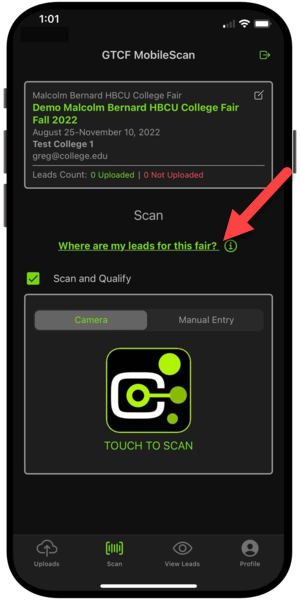
- For Scanning Included or Virtual Fairs:
Your uploaded leads are available in the GTCF Lead Portal Account entered during registration. Contact the colleague who registered your institute.
- For Access Code Fairs:
Your uploaded leads are available in the GTCF Lead Portal Account entered after placing your order. Contact the colleague who ordered your access code.
- GTCF College Matchmaking® Annual Subscription:
Your uploaded leads are available in the GTCF Lead Portal Account entered after placing your order. Contact the colleague who ordered your College Matchmaking® annual subscription.
 Pro Tip: Have an existing lead portal? Be sure to use that when registering for college fairs and placing access code orders. Using your existing lead portal email for new fair registrations will ensure all leads from all fairs populate in one portal.